<?xml version="1.0" encoding="utf-8"?><feed xmlns="http://www.w3.org/2005/Atom" ><generator uri="https://jekyllrb.com/" version="3.10.0">Jekyll</generator><link href="/feed.xml" rel="self" type="application/atom+xml" /><link href="/" rel="alternate" type="text/html" /><updated>2026-01-27T22:16:15+00:00</updated><id>/feed.xml</id><title type="html">Tai Yeong . Song</title><subtitle>Write an awesome description for your new site here. You can edit this line in _config.yml. It will appear in your document head meta (for Google search results) and in your feed.xml site description.</subtitle><author><name>runabird36</name></author><entry><title type="html">Demo Reel</title><link href="/pipeline/2026/01/27/PipelineTD-Demo-Reel.html" rel="alternate" type="text/html" title="Demo Reel" /><published>2026-01-27T00:00:00+00:00</published><updated>2026-01-27T00:00:00+00:00</updated><id>/pipeline/2026/01/27/PipelineTD-Demo-Reel</id><content type="html" xml:base="/pipeline/2026/01/27/PipelineTD-Demo-Reel.html"><![CDATA[<h2 id="demo-reel">Demo Reel</h2>

<iframe width="670" height="425" src="https://www.youtube.com/embed/U2TL8pe0BPM?si=PHPH8OB0jnEs8Sb5" title="YouTube video player" frameborder="0" allow="accelerometer; autoplay; clipboard-write; encrypted-media; gyroscope; picture-in-picture; web-share" referrerpolicy="strict-origin-when-cross-origin" allowfullscreen=""></iframe>]]></content><author><name>runabird36</name></author><category term="Pipeline" /><category term="All" /><summary type="html"><![CDATA[Demo Reel]]></summary></entry><entry><title type="html">KATANA plugins - (Updates) Hair/Fur deformer</title><link href="/pipeline/2025/06/12/cfx-hair-supertools02.html" rel="alternate" type="text/html" title="KATANA plugins - (Updates) Hair/Fur deformer" /><published>2025-06-12T00:00:00+00:00</published><updated>2025-06-12T00:00:00+00:00</updated><id>/pipeline/2025/06/12/cfx-hair-supertools02</id><content type="html" xml:base="/pipeline/2025/06/12/cfx-hair-supertools02.html"><![CDATA[<p><img src="/assets/images/img/deformation_node_01.png" alt="banner" /></p>

<h2 id="summary">summary</h2>
<ul>
  <li>Category : Katana plugin</li>
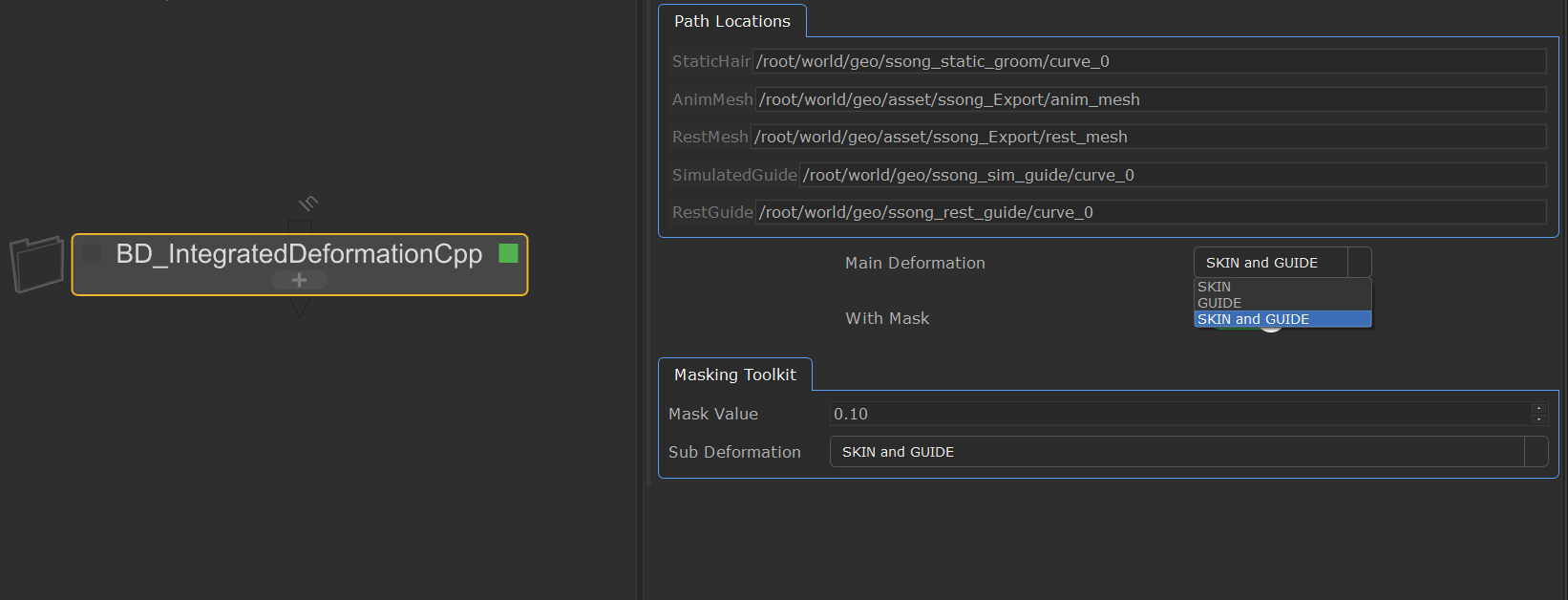
  <li>Plugin Name : BD_IntegratedDeformCpp</li>
  <li>Features
    <ul>
      <li>Deform hair/fur with three types of deformation</li>
      <li>Defer deformation evaluation</li>
    </ul>
  </li>
</ul>

<table>
  <thead>
    <tr>
      <th>Deformation Type</th>
      <th>Description</th>
    </tr>
  </thead>
  <tbody>
    <tr>
      <td>SKIN type</td>
      <td>deform hair/fur based on animated mesh</td>
    </tr>
    <tr>
      <td>GUIDE type</td>
      <td>deform hair/fur based on simulated guides</td>
    </tr>
    <tr>
      <td>SKIN and GUIDE type</td>
      <td>deform hair/fur based on animated mesh and simulated guides</td>
    </tr>
  </tbody>
</table>

<h2 id="demonstration">Demonstration</h2>
<ul>
  <li>DCC used in demo : Katana / Houdini</li>
</ul>

<iframe width="650" height="405" src="https://www.youtube.com/embed/DlKLeA_12zo?si=ocluHlHUyy-MO4m3" title="YouTube video player" frameborder="0" allow="accelerometer; autoplay; clipboard-write; encrypted-media; gyroscope; picture-in-picture; web-share" referrerpolicy="strict-origin-when-cross-origin" allowfullscreen=""></iframe>]]></content><author><name>runabird36</name></author><category term="Pipeline" /><category term="Katana" /><category term="C++" /><category term="Python" /><category term="Math" /><summary type="html"><![CDATA[]]></summary></entry><entry><title type="html">KATANA plugins - Hair/Fur deformer</title><link href="/pipeline/2024/08/28/cfx-hair-supertools.html" rel="alternate" type="text/html" title="KATANA plugins - Hair/Fur deformer" /><published>2024-08-28T00:00:00+00:00</published><updated>2024-08-28T00:00:00+00:00</updated><id>/pipeline/2024/08/28/cfx-hair-supertools</id><content type="html" xml:base="/pipeline/2024/08/28/cfx-hair-supertools.html"><![CDATA[<p><img src="/assets/images/img/cfx_hair_supertools_002.png" alt="banner" /></p>

<h2 id="summary">summary</h2>
<ul>
  <li>Category : Katana plugin</li>
  <li>Plugin list
    <ul>
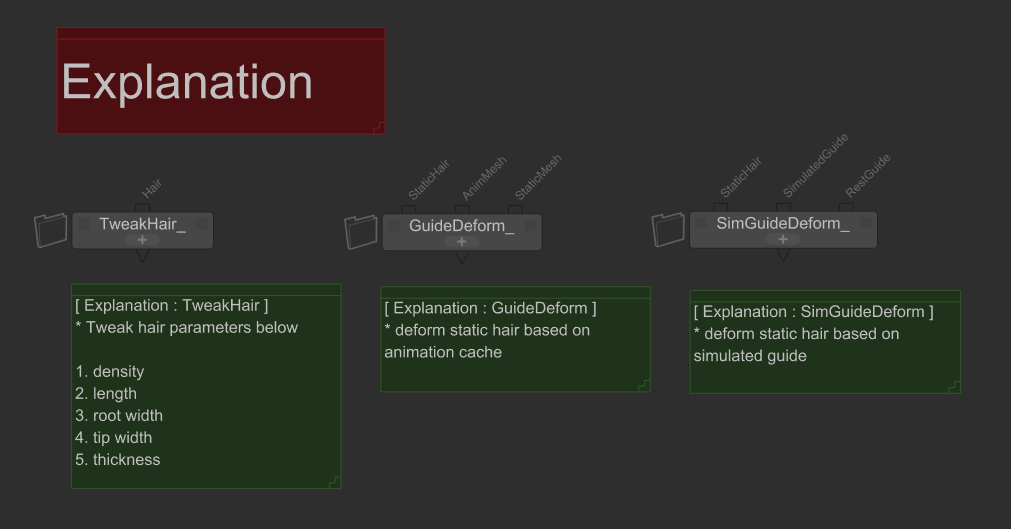
      <li><strong>TweakHair</strong> : tweak hair parameters (density / length / thickness / root thickness / tip thickness)</li>
      <li><strong>SimGuideDeform</strong> : deform static hair based on simulated guides</li>
      <li><strong>GuideDeform</strong> : deform static hair based on animated meshes</li>
    </ul>
  </li>
  <li>Features
    <ul>
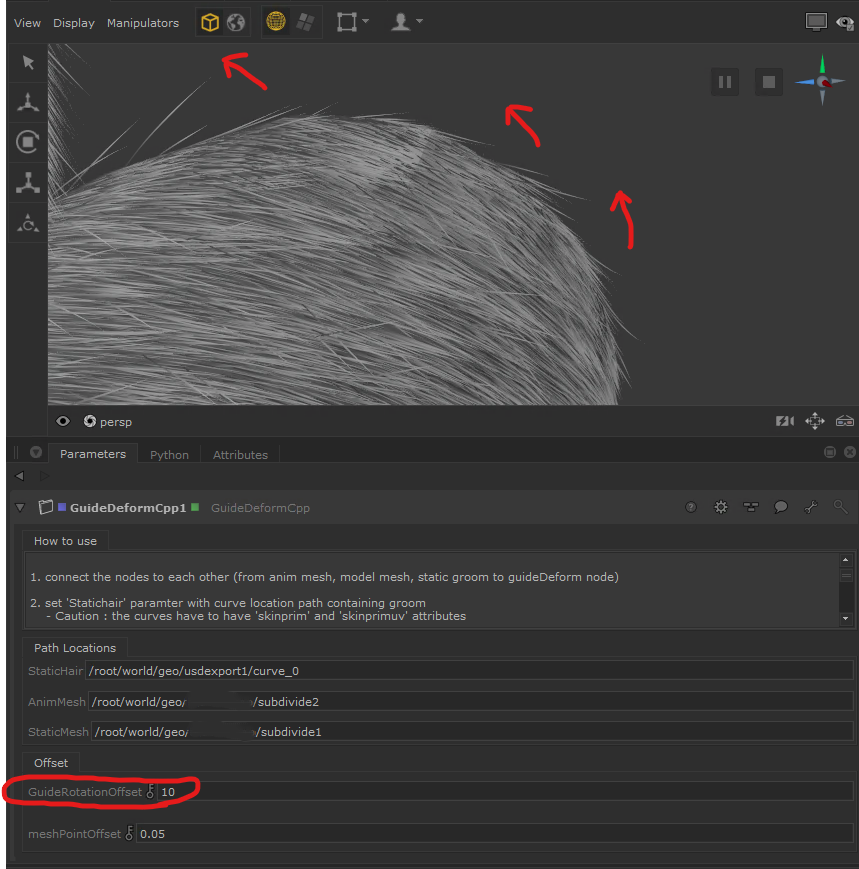
      <li><strong>GuideRotationOffset</strong> : the offset that rotate the points of guide after the deformation proces</li>
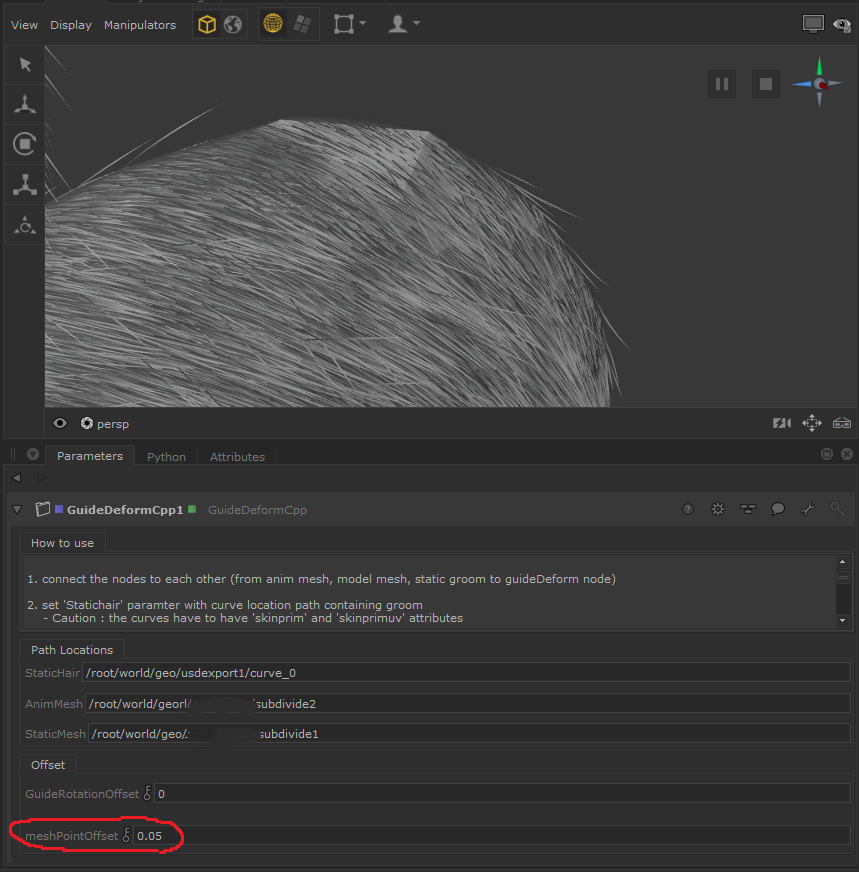
      <li><strong>MeshPointOffset</strong> : the offset that move points of mesh after the deformation process</li>
    </ul>
  </li>
</ul>

<h2 id="offset-features">Offset Features</h2>
<ul>
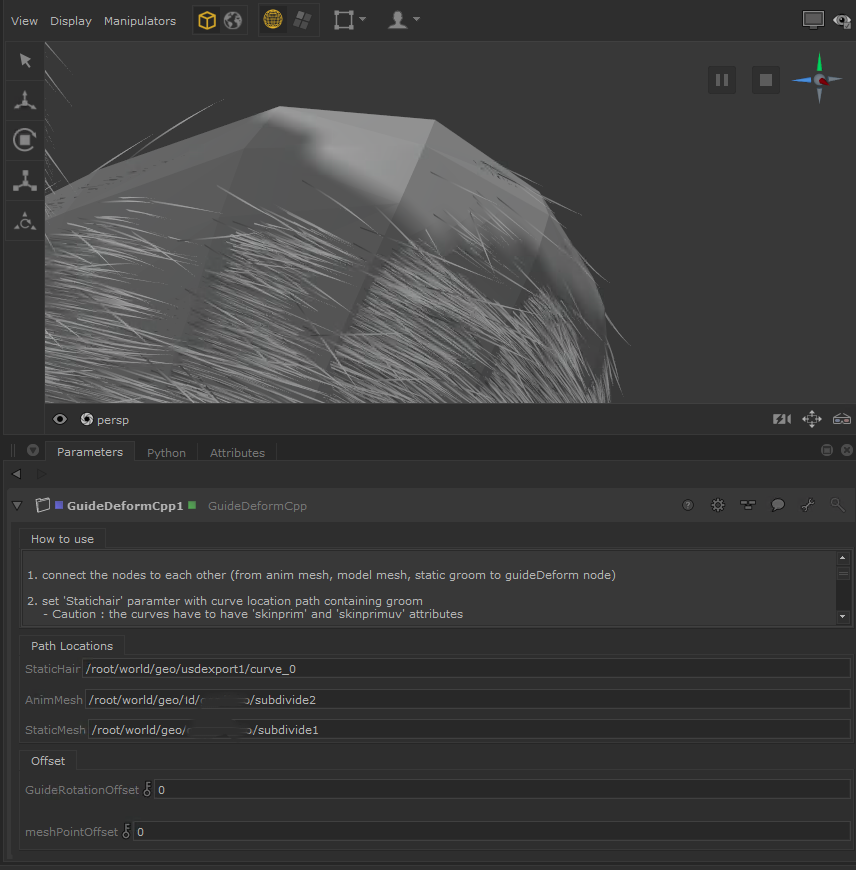
  <li>When an animated mesh is <strong>stretched too much</strong>, Guides penetrate the mesh. and This is when offset features are needed</li>
</ul>

<table>
  <thead>
    <tr>
      <th>Deformation Only</th>
      <th>applying MeshPointOffset</th>
      <th>applying GuideRotationOffset</th>
    </tr>
  </thead>
  <tbody>
    <tr>
      <td><img src="/assets/images/img/offset_001.png" alt="origin" /></td>
      <td><img src="/assets/images/img/offset_002.png" alt="meshPointOffset" /></td>
      <td><img src="/assets/images/img/offset_003.png" alt="GuideRotationOffset" /></td>
    </tr>
  </tbody>
</table>

<hr />

<h2 id="optimization">Optimization</h2>
<ul>
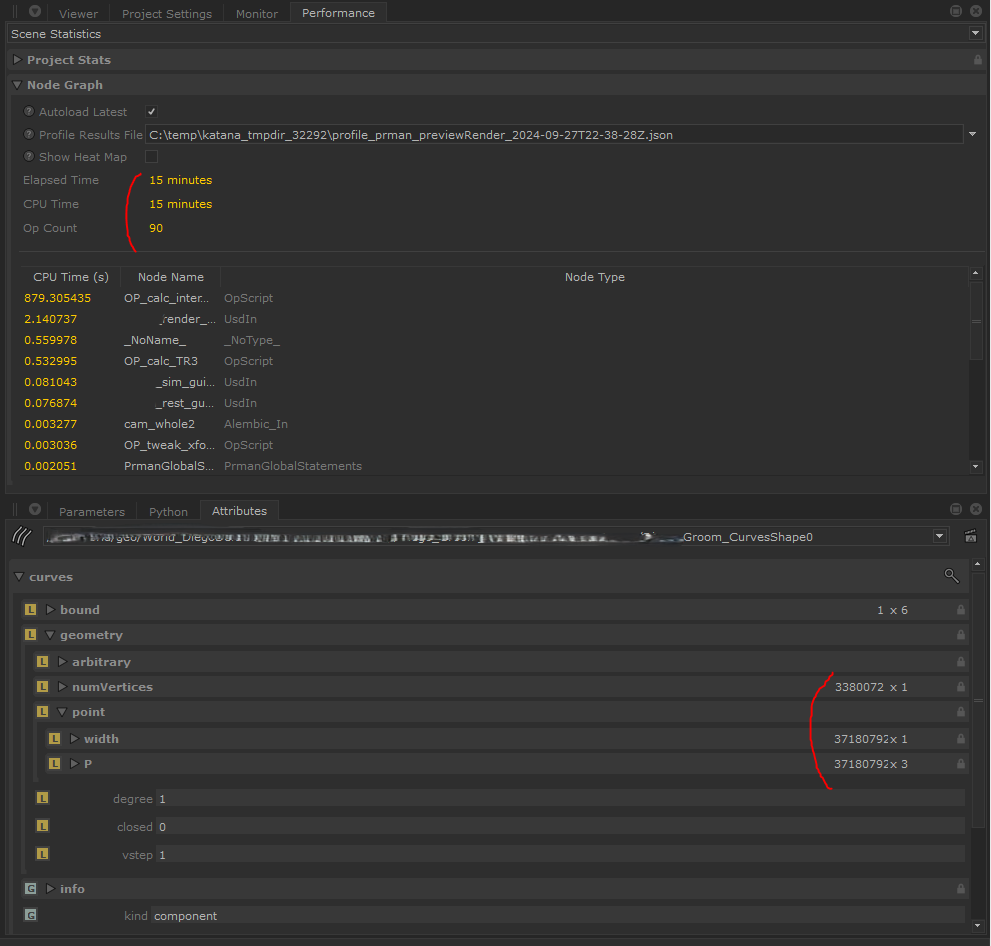
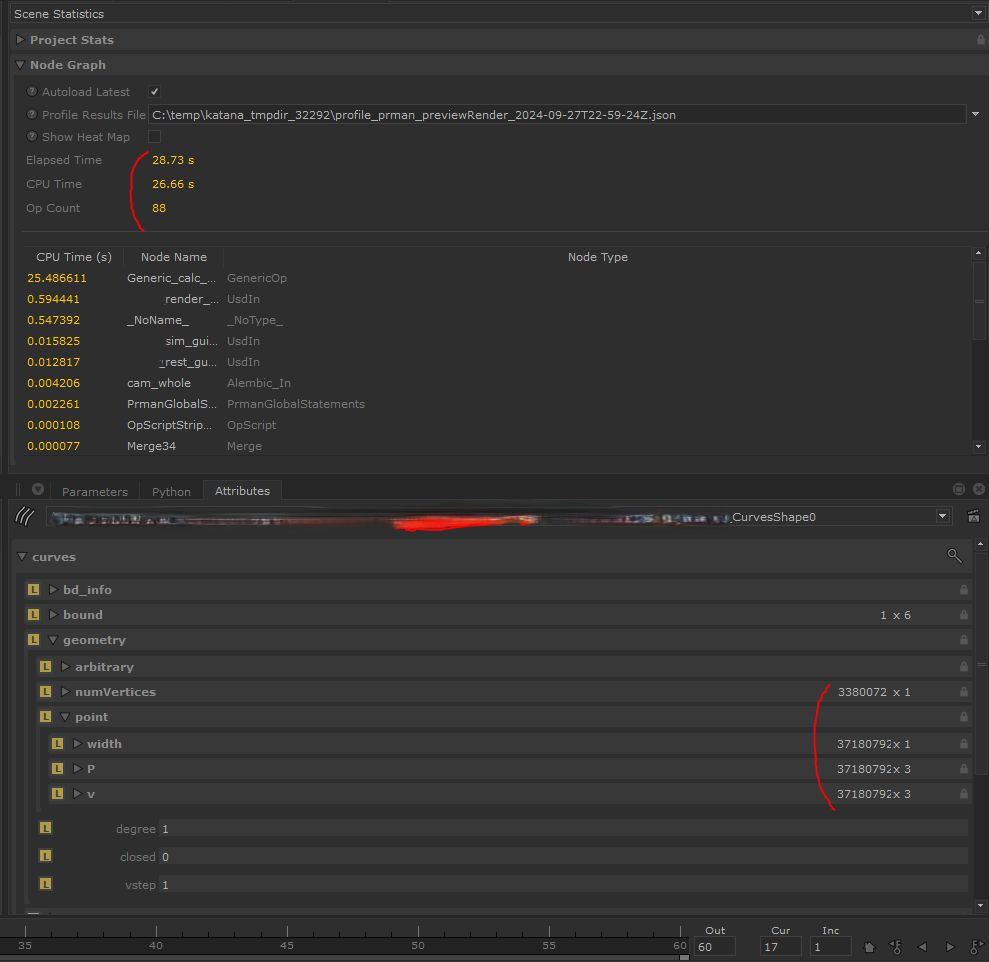
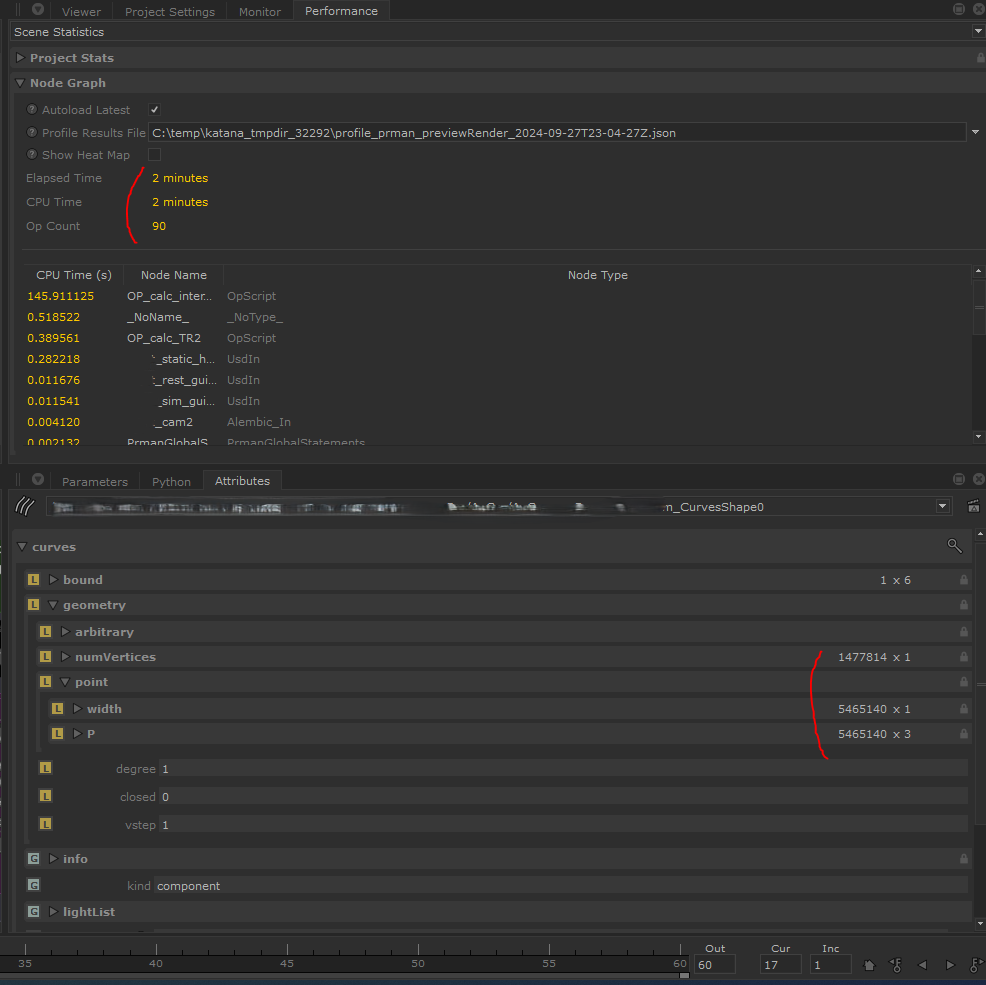
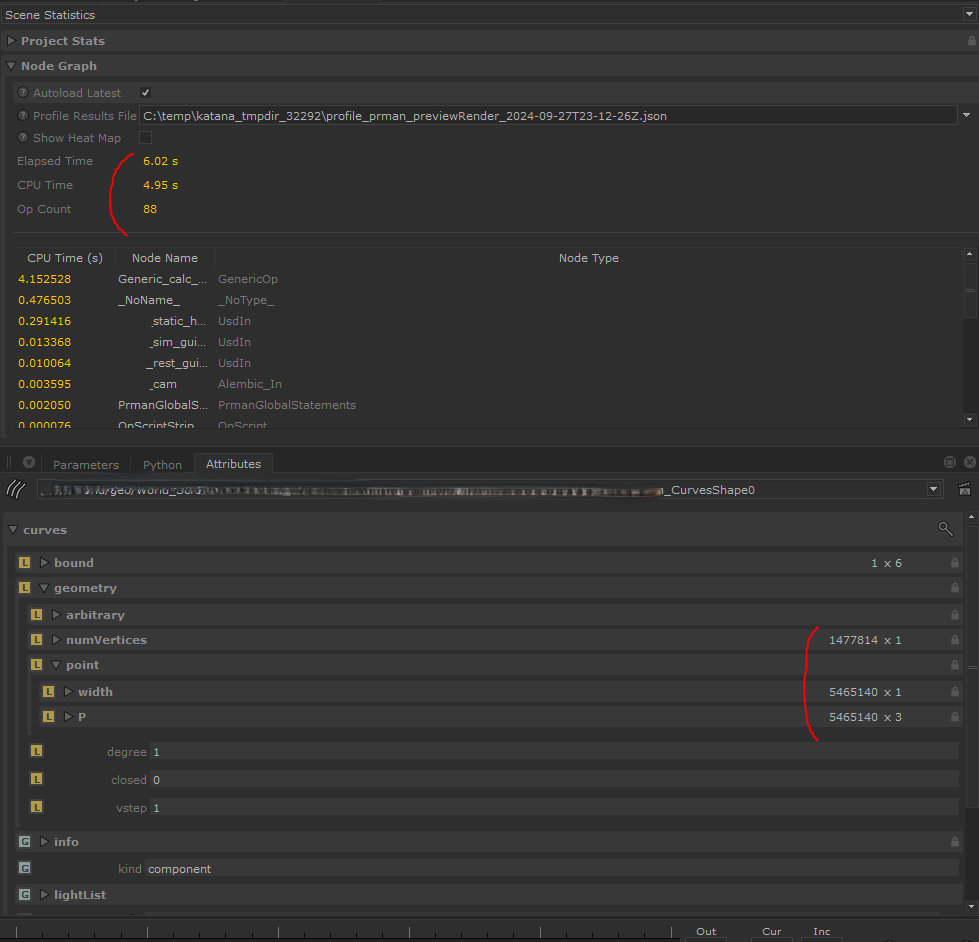
  <li>Issue : deformation calculation time is too long when move frame one by one.</li>
  <li>Solution : Implement deformation formula using C++</li>
  <li>Performance comparison.
    <ul>
      <li>feel free to refer to attached images which show ‘Render performance’ in katana (if you click image, you can zoom in )</li>
    </ul>
  </li>
</ul>

<table>
  <thead>
    <tr>
      <th>Spec of Character</th>
      <th>using lua script</th>
      <th>using C++</th>
    </tr>
  </thead>
  <tbody>
    <tr>
      <td><span style="display:block; text-align:center;">- Character A <br /> - point count : <strong>37,180,792</strong> <br /> - strand count : <strong>3,380,072</strong></span></td>
      <td>- Elapsed Time : <strong>15 mins</strong> <br /> <img src="/assets/images/img/char_A_lua.PNG" alt="CharALua" /></td>
      <td>- Elapsed Time : <strong>28.73 sec</strong> <br /> <img src="/assets/images/img/char_A_cpp.PNG" alt="CharACpp" /></td>
    </tr>
    <tr>
      <td><span style="display:block; text-align:center;">- Character B <br /> - point count : <strong>5,465,140</strong> <br /> - strand count : <strong>1,477,814</strong></span></td>
      <td>- Elapsed Time : <strong>2 mins</strong> <br /> <img src="/assets/images/img/char_B_lua.PNG" alt="CharALua" /></td>
      <td>- Elapsed Time : <strong>6.02 sec</strong> <img src="/assets/images/img/char_B_cpp.PNG" alt="CharACpp" /></td>
    </tr>
  </tbody>
</table>

<h2 id="demonstration">Demonstration</h2>
<ul>
  <li>Data : simple demo character</li>
</ul>

<iframe width="650" height="405" src="https://www.youtube.com/embed/KuFu3CsN1XI?si=Re3n1-9RRBcuYu23" title="YouTube video player" frameborder="0" allow="accelerometer; autoplay; clipboard-write; encrypted-media; gyroscope; picture-in-picture; web-share" referrerpolicy="strict-origin-when-cross-origin" allowfullscreen=""></iframe>

<h2 id="render-results">Render results</h2>
<ul>
  <li>Data : simple demo character</li>
</ul>

<iframe width="650" height="405" src="https://www.youtube.com/embed/Nz1TM1Bx6HA?si=qsFgU1II_wzTKL-1" title="YouTube video player" frameborder="0" allow="accelerometer; autoplay; clipboard-write; encrypted-media; gyroscope; picture-in-picture; web-share" referrerpolicy="strict-origin-when-cross-origin" allowfullscreen=""></iframe>]]></content><author><name>runabird36</name></author><category term="Pipeline" /><category term="Katana" /><category term="C++" /><category term="lua" /><category term="Python" /><category term="Math" /><summary type="html"><![CDATA[]]></summary></entry><entry><title type="html">RV plugin - Version Canvas</title><link href="/pipeline/2024/01/15/rv-plugins-versionCanvas.html" rel="alternate" type="text/html" title="RV plugin - Version Canvas" /><published>2024-01-15T00:00:00+00:00</published><updated>2024-01-15T00:00:00+00:00</updated><id>/pipeline/2024/01/15/rv-plugins-versionCanvas</id><content type="html" xml:base="/pipeline/2024/01/15/rv-plugins-versionCanvas.html"><![CDATA[<blockquote>
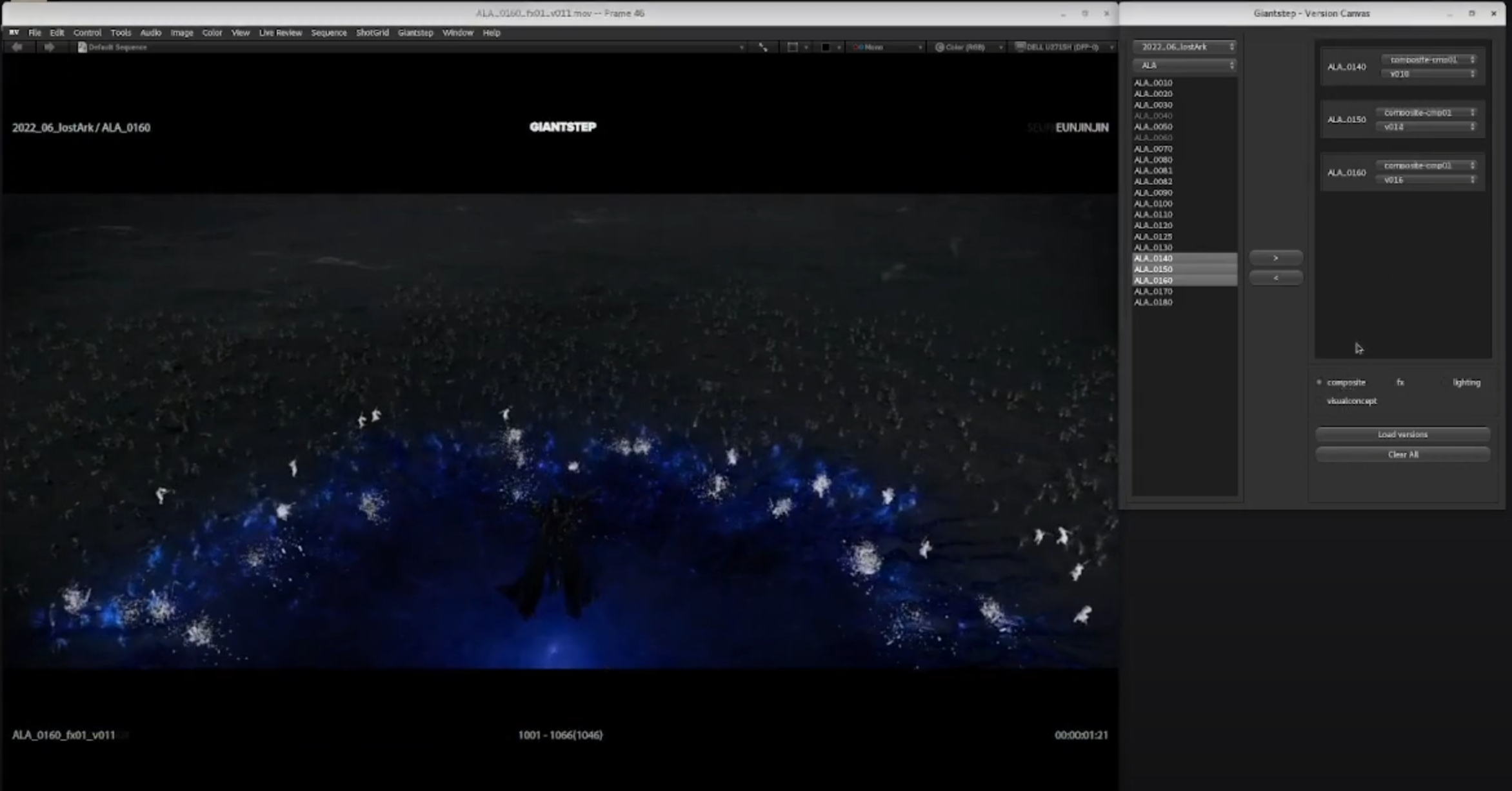
  <iframe width="750" height="505" src="https://www.youtube.com/embed/cFocScYdudc?si=2JRG1IGzL3udiY_a" title="YouTube video player" frameborder="0" allow="accelerometer; autoplay; clipboard-write; encrypted-media; gyroscope; picture-in-picture; web-share" allowfullscreen=""></iframe>
</blockquote>

<h2 id="summary">summary</h2>
<ul>
  <li>Category : shotgrid RV plugin</li>
  <li>Tool Name : Version Canvas</li>
  <li>Features :
    <ul>
      <li>collect media of selected shots and play at once</li>
      <li>compare different version number media of one shot</li>
    </ul>
  </li>
</ul>

<p><img src="/assets/images/img/versionCanvas.png" alt="Version Canvas Tool" /></p>]]></content><author><name>runabird36</name></author><category term="Pipeline" /><category term="RV" /><category term="Shotgrid" /><category term="Python" /><summary type="html"><![CDATA[]]></summary></entry><entry><title type="html">USD Stress Test</title><link href="/pipeline/2023/10/03/USD-building-asset.html" rel="alternate" type="text/html" title="USD Stress Test" /><published>2023-10-03T00:00:00+00:00</published><updated>2023-10-03T00:00:00+00:00</updated><id>/pipeline/2023/10/03/USD-building-asset</id><content type="html" xml:base="/pipeline/2023/10/03/USD-building-asset.html"><![CDATA[<blockquote>
  <iframe title="vimeo-player" src="https://player.vimeo.com/video/870657351?h=61d3eb02ff" width="700" height="420" frameborder="0" allowfullscreen=""></iframe>
</blockquote>

<h2 id="summary">summary</h2>
<ul>
  <li>Build animated asset by using USD python API
    <ul>
      <li>Ani variant : only use usdPreviewSurface material</li>
      <li>Render Variant : apply all shaders which are worked by loodev artist including displacement map</li>
    </ul>
  </li>
  <li>arrange 10000 assets with iteration</li>
</ul>

<h2 id="detail">Detail</h2>

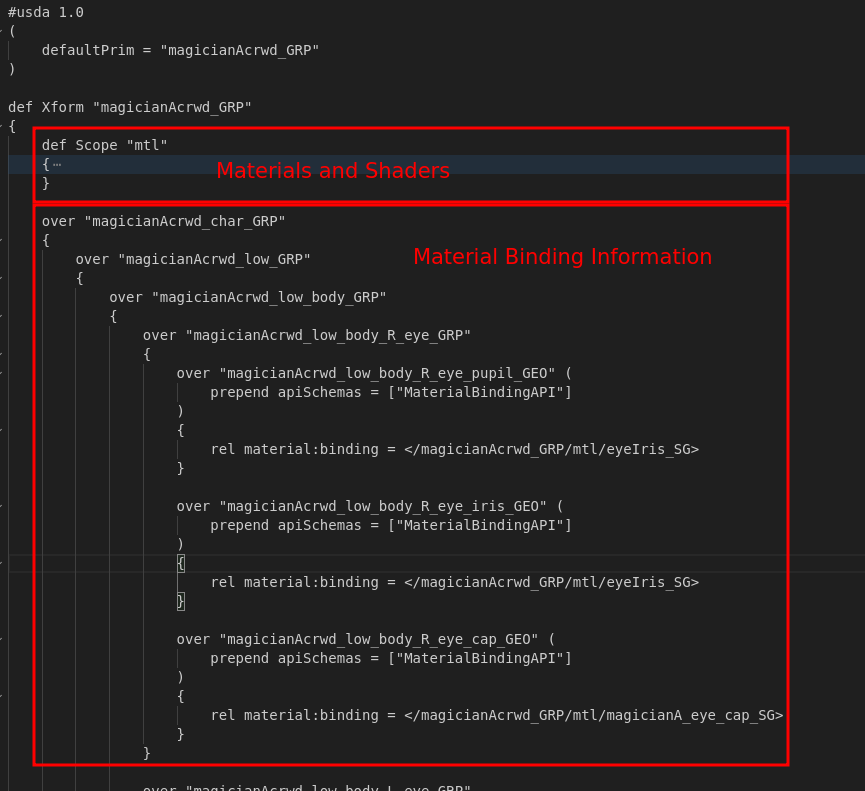
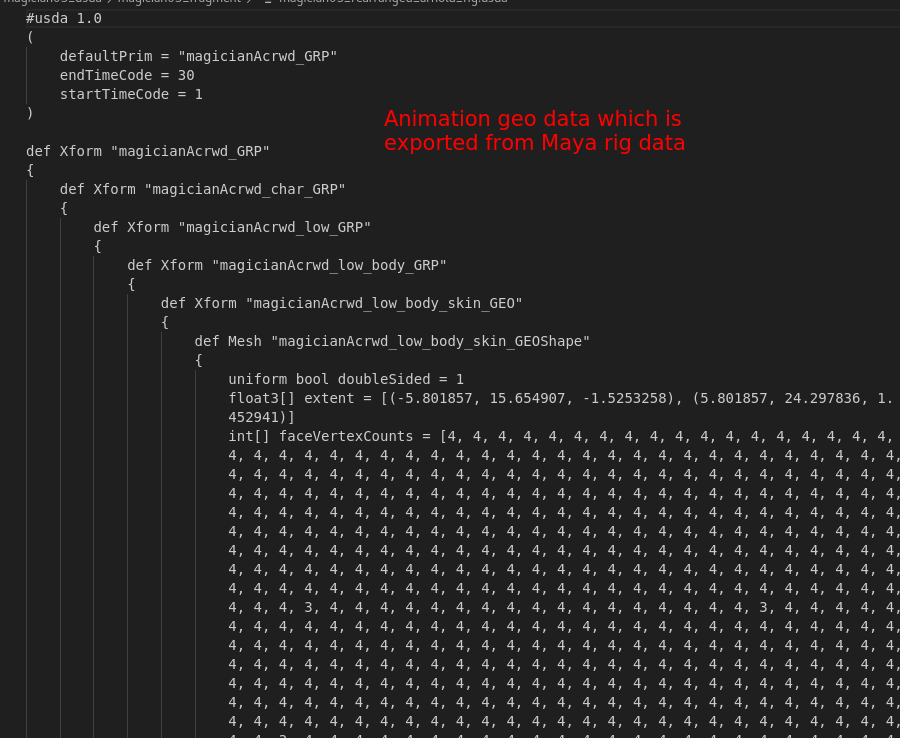
<p><strong>1. Export lookdev and Animated geometry</strong></p>
<ul>
  <li>Do Material binding</li>
</ul>

<table>
  <thead>
    <tr>
      <th style="text-align: left">Lookdev fragment</th>
      <th style="text-align: left">Geo fragment</th>
    </tr>
  </thead>
  <tbody>
    <tr>
      <td style="text-align: left"><img src="/assets/images/img/04_usd_ldv_fragment.png" alt="" /></td>
      <td style="text-align: left"><img src="/assets/images/img/05_usd_ani_fragment.png" alt="" /></td>
    </tr>
  </tbody>
</table>

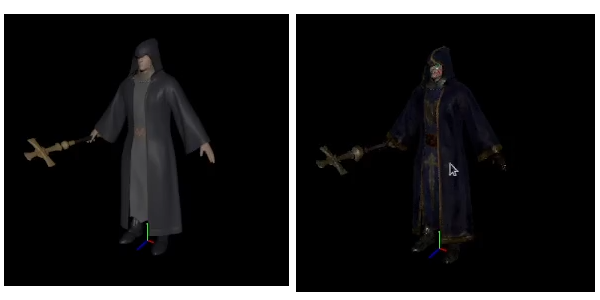
<ul>
  <li>Asset - variant ( Ani / Render )
<img src="/assets/images/img/magician_asset.png" alt="USD_asset" /></li>
</ul>

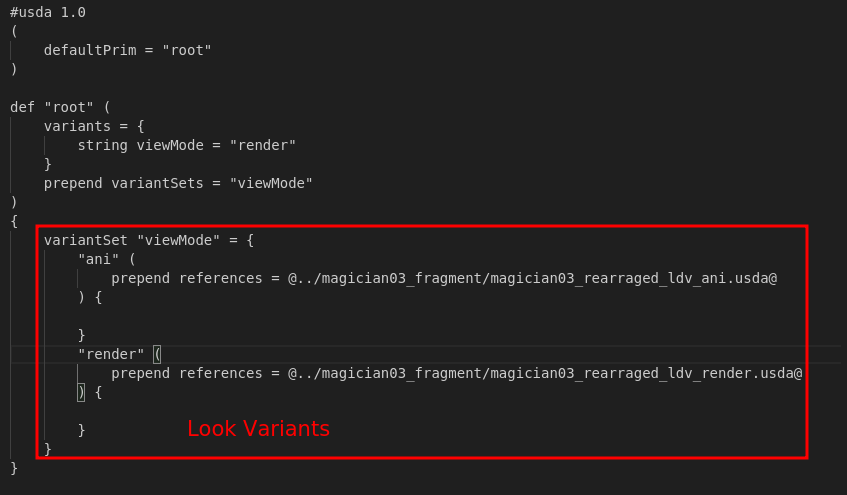
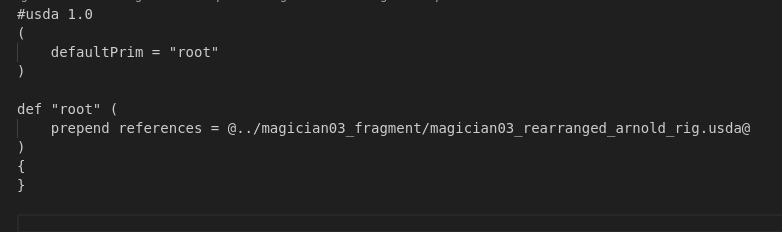
<p><strong>2. Author variantSet based on Render Purpose</strong></p>

<p><img src="/assets/images/img/03_usd_ldv_entity.png" alt="USD Lookdev Entity" />
<img src="/assets/images/img/02_usd_geo_entity.png" alt="USD Animated geo Entity" /></p>]]></content><author><name>runabird36</name></author><category term="Pipeline" /><category term="Houdini" /><category term="Maya" /><category term="USD" /><category term="Python" /><summary type="html"><![CDATA[]]></summary></entry><entry><title type="html">USDview - Arnold Render Delegate</title><link href="/pipeline/2023/10/03/arnold-render-delegate.html" rel="alternate" type="text/html" title="USDview - Arnold Render Delegate" /><published>2023-10-03T00:00:00+00:00</published><updated>2023-10-03T00:00:00+00:00</updated><id>/pipeline/2023/10/03/arnold-render-delegate</id><content type="html" xml:base="/pipeline/2023/10/03/arnold-render-delegate.html"><![CDATA[<p><a href="https://youtu.be/VIJQ38TgNN8"> Arnold render delegate USDview ( link )</a></p>
<blockquote>
  <iframe width="750" height="505" src="https://www.youtube.com/embed/VIJQ38TgNN8?si=qA4xhzVjVp__QNCg" title="YouTube video player" frameborder="0" allow="accelerometer; autoplay; clipboard-write; encrypted-media; gyroscope; picture-in-picture; web-share" allowfullscreen=""></iframe>
</blockquote>

<h2 id="summary">Summary</h2>
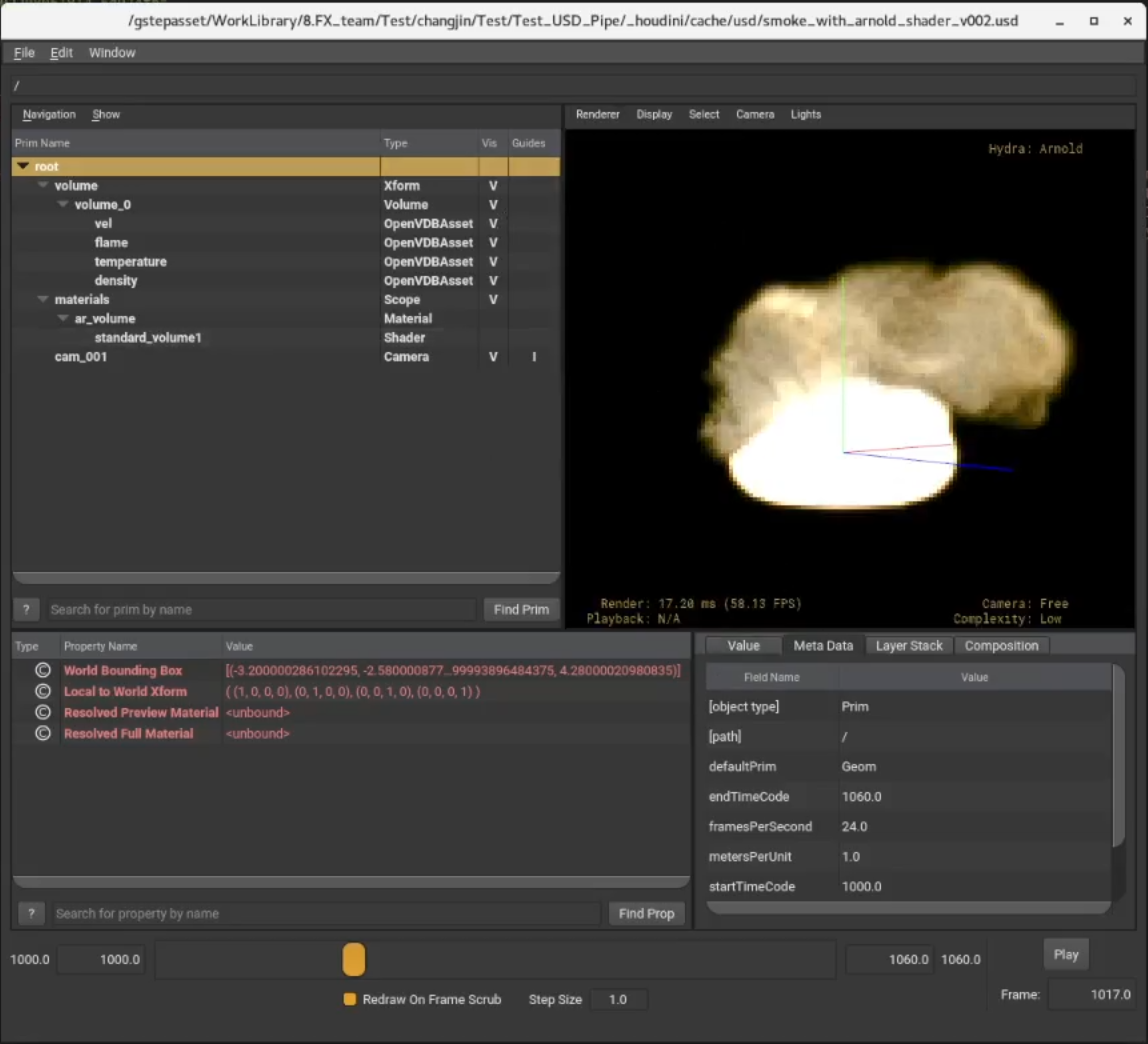
<ul>
  <li>Check usd which is including arnold components</li>
  <li>Do CMake build <a href="https://github.com/Autodesk/arnold-usd">arnold-usd github resource</a></li>
  <li>OS : Rocky Linux 8.8</li>
</ul>

<p><img src="/assets/images/img/usd_arnold_delegate.png" alt="USDview_arnold" /></p>]]></content><author><name>runabird36</name></author><category term="Pipeline" /><category term="USD" /><category term="Maya" /><category term="Houdini" /><category term="USDview" /><summary type="html"><![CDATA[Arnold render delegate USDview ( link )]]></summary></entry><entry><title type="html">Scene Assembly using Render Procedural</title><link href="/pipeline/2023/07/04/Operator-scene-assembly.html" rel="alternate" type="text/html" title="Scene Assembly using Render Procedural" /><published>2023-07-04T00:00:00+00:00</published><updated>2023-07-04T00:00:00+00:00</updated><id>/pipeline/2023/07/04/Operator-scene-assembly</id><content type="html" xml:base="/pipeline/2023/07/04/Operator-scene-assembly.html"><![CDATA[<iframe title="vimeo-player" src="https://player.vimeo.com/video/870051101?h=103f71f263" width="640" height="360" frameborder="0" allowfullscreen=""></iframe>

<h2 id="explanation">Explanation</h2>
<ul>
  <li>Assemble data in lighting scene with Arnold operator and OTX tool
    <ul>
      <li>OTX
        <ul>
          <li>Select published lookdev data</li>
          <li>Set Arnold shape attribute</li>
        </ul>
      </li>
    </ul>
  </li>
</ul>

<h2 id="another-case">Another case</h2>
<ul>
  <li>Path mapping between Windows and Rocky linux</li>
</ul>
<iframe width="630" height="385" src="https://www.youtube.com/embed/2B-GWxfeVIk?si=h16btgVwRzYT6qZd" title="YouTube video player" frameborder="0" allow="accelerometer; autoplay; clipboard-write; encrypted-media; gyroscope; picture-in-picture; web-share" allowfullscreen=""></iframe>

<ul>
  <li>Specification
    <ul>
      <li>OS         : windows</li>
      <li>Data       : maya scene lookdev asset data worked on linux</li>
      <li>Issue      : textures are not recognized</li>
      <li>Solution   : With aiStringReplace node which is one of the operator nodes, fix texture path at render time</li>
    </ul>
  </li>
</ul>]]></content><author><name>runabird36</name></author><category term="Pipeline" /><category term="Arnold" /><category term="Maya" /><category term="Operator" /><category term="Render Procedural" /><summary type="html"><![CDATA[]]></summary></entry><entry><title type="html">Crowd using Arnold render procedural</title><link href="/pipeline/2023/06/04/crowd-with-operator-md.html" rel="alternate" type="text/html" title="Crowd using Arnold render procedural" /><published>2023-06-04T00:00:00+00:00</published><updated>2023-06-04T00:00:00+00:00</updated><id>/pipeline/2023/06/04/crowd-with-operator-md</id><content type="html" xml:base="/pipeline/2023/06/04/crowd-with-operator-md.html"><![CDATA[<hr />

<p><img src="/assets/images/img/crowd_whole02.png" alt="yeti_whole" /></p>

<h2 id="summary">Summary</h2>

<ul>
  <li>render approximately 7500 characters</li>
  <li>Data in used :
    <ul>
      <li>crowd : exported from golaem in aistandin</li>
      <li>lookdev : exported with aistandin (arnold scene description data)</li>
      <li>arnold operator nodes : lookdev information and all connection information</li>
    </ul>
  </li>
</ul>

<hr />

<h2 id="details">Details</h2>

<ul>
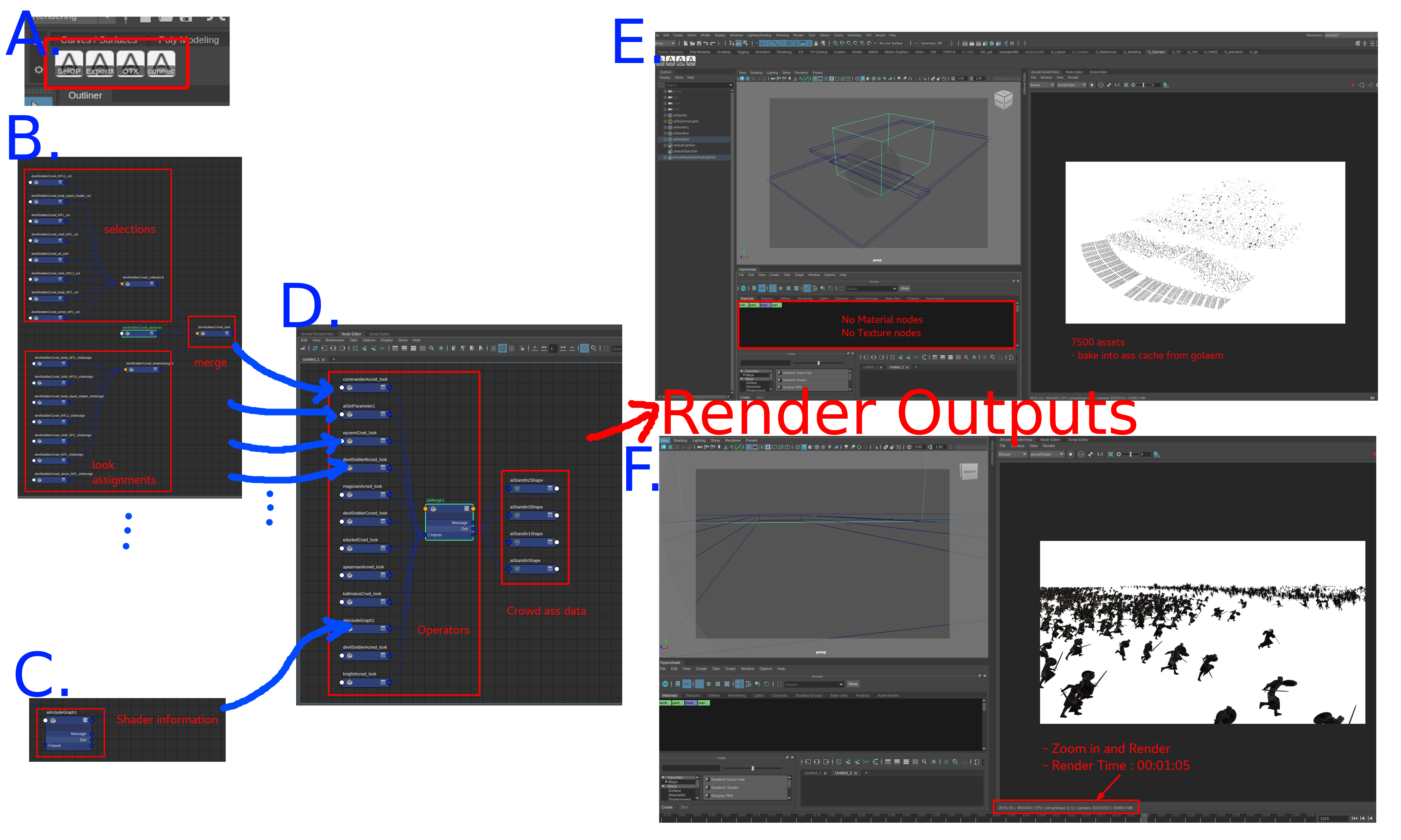
  <li>A. developed tools for work
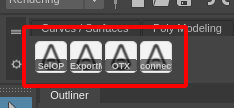
    <blockquote>
      <p><img src="/assets/images/img/Operator_07.png" alt="dev tools" /></p>
    </blockquote>
  </li>
  <li>B. Each asset operator node tree
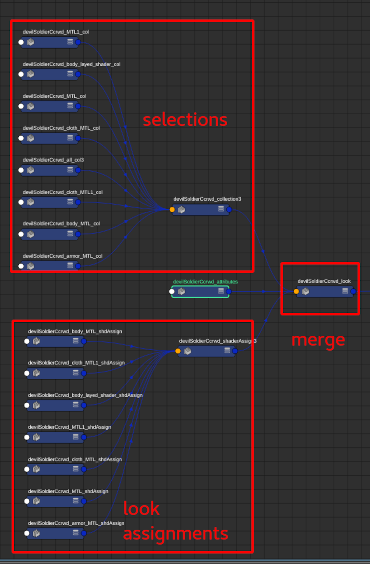
    <ul>
      <li>Selection : grouping shapes that is assigned to same material</li>
      <li>Assignment Information : link between above selections and material</li>
      <li>merge : merge all node</li>
    </ul>
  </li>
</ul>

<blockquote>
  <p><img src="/assets/images/img/Operator_05_resized.png" alt="Each asset node tree" /></p>
</blockquote>

<ul>
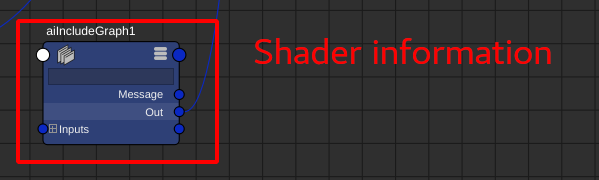
  <li>C. all materials informations
    <ul>
      <li>export all asset’s lookdev into aistandin format (.ass)</li>
      <li>and then import with aiInclude operator node</li>
    </ul>
  </li>
</ul>

<blockquote>
  <p><img src="/assets/images/img/Operator_08.png" alt="lookdev information" /></p>
</blockquote>

<ul>
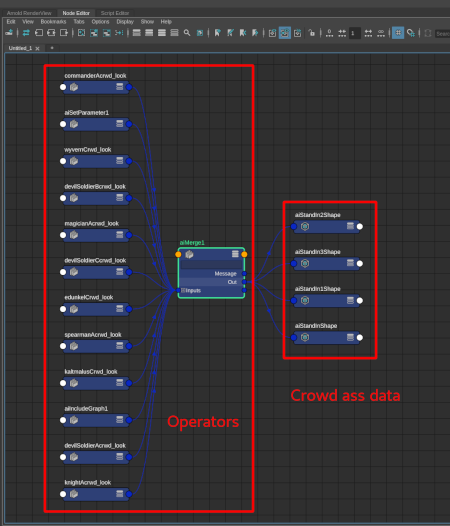
  <li>D. merge all asset’s node tree and all materials, and then connect to crowd aistandin node</li>
</ul>

<blockquote>
  <p><img src="/assets/images/img/Operator_04_resized.png" alt="All node tree" /></p>
</blockquote>

<ul>
  <li>E. render results
    <ul>
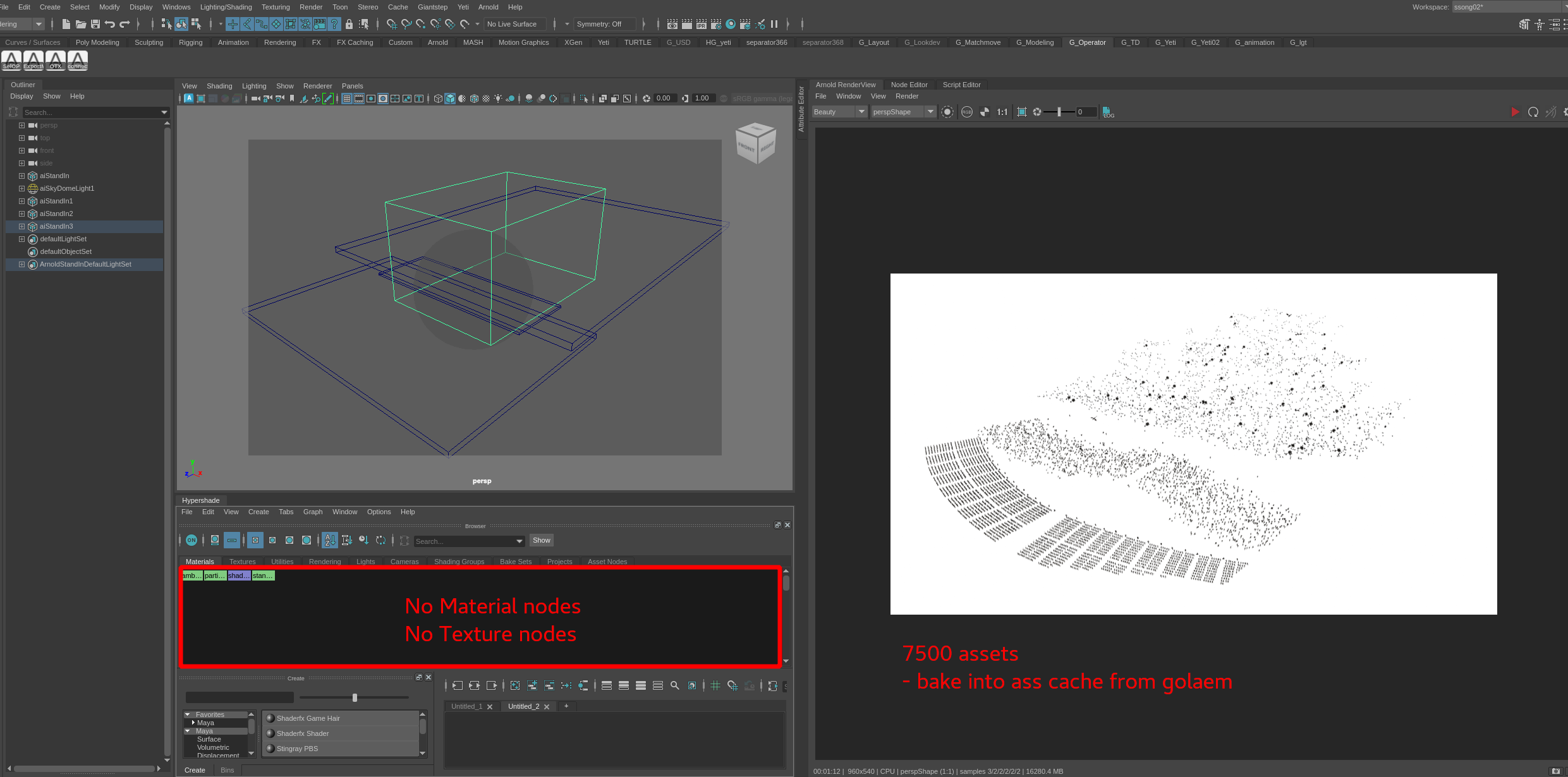
      <li>In hypershade window, we could find that there is no materials and texture nodes</li>
    </ul>
  </li>
</ul>

<blockquote>
  <p><img src="/assets/images/img/Operator_01.png" alt="render results 01" /></p>
</blockquote>

<ul>
  <li>F. Zoom in and render results
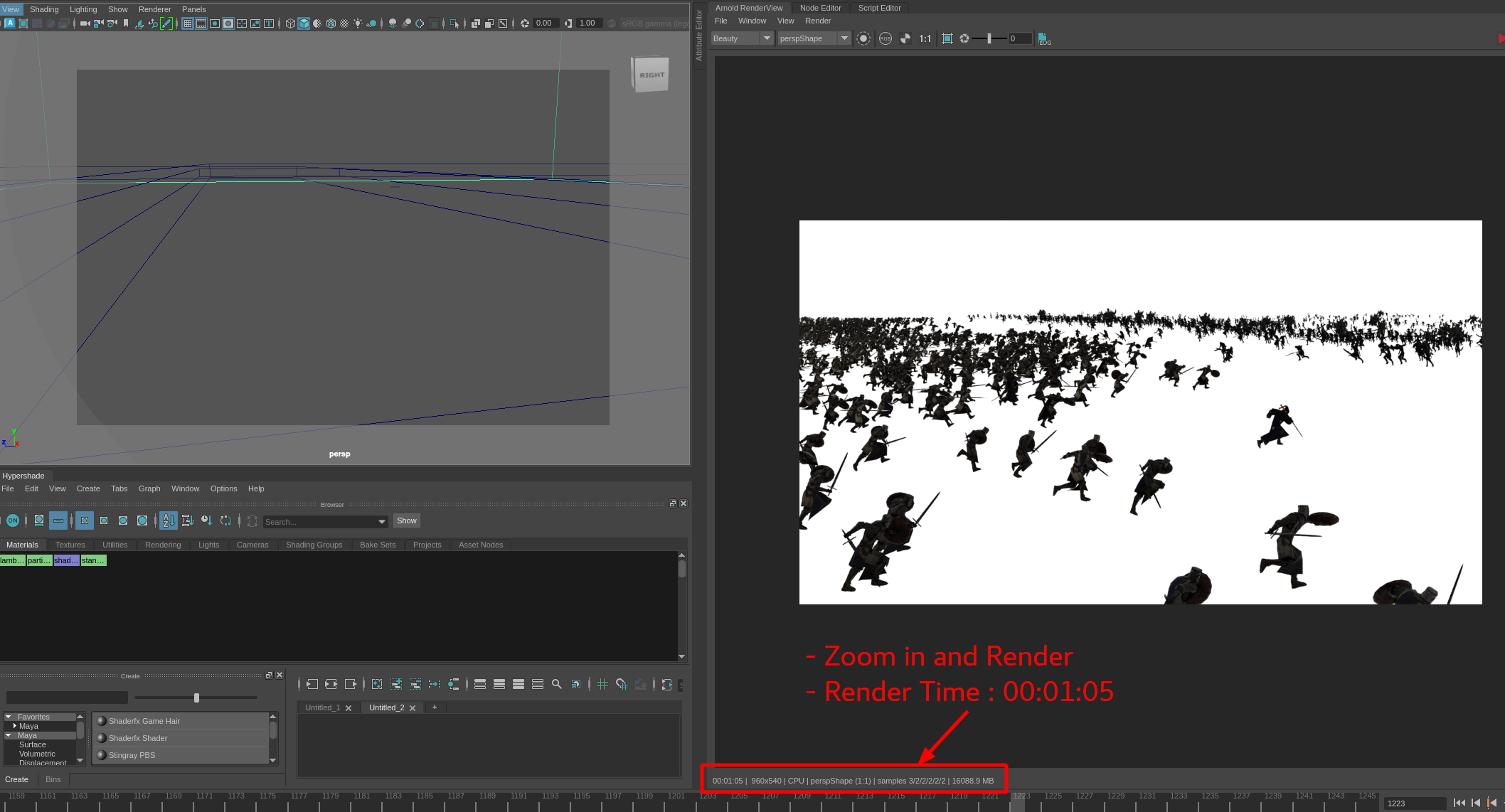
    <ul>
      <li>render time : 00:01:05</li>
    </ul>
  </li>
</ul>

<blockquote>
  <p><img src="/assets/images/img/Operator_03_render.png" alt="render results 02" /></p>
</blockquote>]]></content><author><name>runabird36</name></author><category term="Pipeline" /><category term="Crowd" /><category term="Maya" /><category term="Arnold" /><category term="Render Procedural" /><category term="Operator" /><summary type="html"><![CDATA[]]></summary></entry><entry><title type="html">Assetlibrary - Import asset into houdini</title><link href="/pipeline/2023/05/22/assetlibrary-houdini.html" rel="alternate" type="text/html" title="Assetlibrary - Import asset into houdini" /><published>2023-05-22T00:00:00+00:00</published><updated>2023-05-22T00:00:00+00:00</updated><id>/pipeline/2023/05/22/assetlibrary-houdini</id><content type="html" xml:base="/pipeline/2023/05/22/assetlibrary-houdini.html"><![CDATA[<h2 id="summary">Summary</h2>

<ul>
  <li>Assetlibrary
    <ul>
      <li>Import to houdini</li>
    </ul>
  </li>
</ul>

<h2 id="demonstration">Demonstration</h2>

<p><a href="https://youtu.be/87tZtX2DZIw"> Import from assetlibrary to houdini ( link )</a></p>
<blockquote>
  <iframe width="750" height="505" src="https://www.youtube.com/embed/87tZtX2DZIw?si=d0Ds1_HIeUxtB0XP" title="YouTube video player" frameborder="0" allow="accelerometer; autoplay; clipboard-write; encrypted-media; gyroscope; picture-in-picture; web-share" allowfullscreen=""></iframe>
</blockquote>]]></content><author><name>runabird36</name></author><category term="Pipeline" /><category term="Standalone" /><category term="Asset" /><category term="Houdini" /><category term="PyQt" /><category term="Python" /><summary type="html"><![CDATA[Summary]]></summary></entry><entry><title type="html">Assetlibrary - Navigate / Upload / Download / Delete</title><link href="/pipeline/2023/05/22/assetlibrary-whole.html" rel="alternate" type="text/html" title="Assetlibrary - Navigate / Upload / Download / Delete" /><published>2023-05-22T00:00:00+00:00</published><updated>2023-05-22T00:00:00+00:00</updated><id>/pipeline/2023/05/22/assetlibrary-whole</id><content type="html" xml:base="/pipeline/2023/05/22/assetlibrary-whole.html"><![CDATA[<h2 id="summary">Summary</h2>

<ul>
  <li>Assetlibrary
    <ul>
      <li>searching asset</li>
      <li>confirm asset information</li>
      <li>upload new asset</li>
      <li>download asset</li>
      <li>delete asset</li>
    </ul>
  </li>
</ul>

<hr />

<h2 id="demonstration">Demonstration</h2>

<p><a href="https://youtu.be/LNYQvntbW_8"> Navigating demo ( link )</a></p>
<blockquote>
  <iframe width="750" height="505" src="https://www.youtube.com/embed/LNYQvntbW_8?si=gkfma6Mw1iLlCZ0_" title="YouTube video player" frameborder="0" allow="accelerometer; autoplay; clipboard-write; encrypted-media; gyroscope; picture-in-picture; web-share" allowfullscreen=""></iframe>
</blockquote>

<p><a href="https://youtu.be/EtpVeRqE26M"> Uploading demo ( link )</a></p>
<blockquote>
  <iframe width="750" height="505" src="https://www.youtube.com/embed/EtpVeRqE26M?si=ZqhpFs9FBSUvbfuZ" title="YouTube video player" frameborder="0" allow="accelerometer; autoplay; clipboard-write; encrypted-media; gyroscope; picture-in-picture; web-share" allowfullscreen=""></iframe>
</blockquote>

<p><a href="https://youtu.be/RV3lrLUB-Zo"> Downloading demo ( link )</a></p>
<blockquote>
  <iframe width="750" height="505" src="https://www.youtube.com/embed/RV3lrLUB-Zo?si=H2dZ6_EG_3hMYwlT" title="YouTube video player" frameborder="0" allow="accelerometer; autoplay; clipboard-write; encrypted-media; gyroscope; picture-in-picture; web-share" allowfullscreen=""></iframe>
</blockquote>

<p><a href="https://youtu.be/zaoMj3EwfAM"> Delete demo ( link )</a></p>
<blockquote>
  <iframe width="750" height="505" src="https://www.youtube.com/embed/zaoMj3EwfAM?si=Cz68w0odH4rklFAf" title="YouTube video player" frameborder="0" allow="accelerometer; autoplay; clipboard-write; encrypted-media; gyroscope; picture-in-picture; web-share" allowfullscreen=""></iframe>
</blockquote>]]></content><author><name>runabird36</name></author><category term="Pipeline" /><category term="Standalone" /><category term="Asset" /><category term="PyQt" /><category term="Python" /><summary type="html"><![CDATA[Summary]]></summary></entry></feed>